
- Open the plan in TrueScale Print (PDF, scan or photo).
- Check the scale – calibrate from the longest dimension you can find.
- Crop to the part, choose A4 or Letter, and print at Actual size.
- Measure the ruler on sheet one, assemble with the diagonals, and stick it to the stock.
1. Get the plan into the right shape
- Full-size PDF plans open at true size – just check one dimension.
- Scaled drawings (“scale 1:4”): set Scale vs. native to 400%, or calibrate from any printed dimension.
- Grid drawings (“1 square = 1 inch”): see enlarging a pattern from a grid.
- From CAD: see printing a CAD drawing at full size.
2. Calibrate from the longest dimension
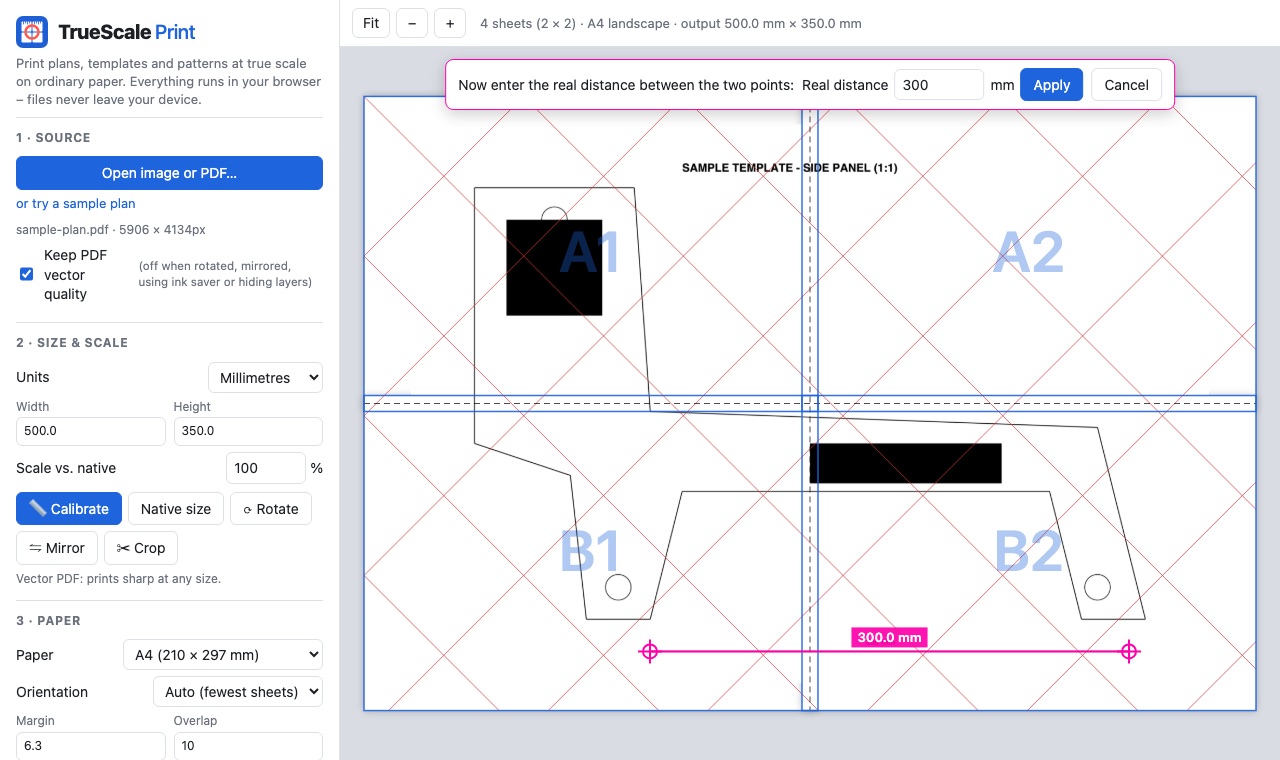
Errors scale with distance: a 1-pixel slip across 50 mm matters far more than across 900 mm. Pick the longest dimension on the drawing – overall length of a rocker or a leg – click its ends with Calibrate and type the length.
3. Crop, mirror, print
Plans often show several parts per sheet. Use Crop to print only the part you need. For left- and right-hand pairs, print once, then use Mirror and print again. Solid black profiles? Turn on Ink saver – edges stay crisp and the fill prints light.
Print settings that keep the scale
Most “wrong size” prints come from the print dialog, not the file. Whatever program you print from:
- Choose Actual size or 100%. In Chrome or Edge, set Scale to Default or 100 – not “Fit to printable area”.
- On a Mac, untick Scale to fit paper size under Paper Handling.
- Turn off borderless printing; it enlarges the page slightly so the ink reaches the edge.
- Make sure the paper size in the print dialog matches the paper you chose in TrueScale Print (A4 vs. US Letter).
4. Assemble and transfer to wood
- Assemble flat on a table: trim one edge per join on the dashed line, overlap, match the red diagonals, tape.
- Stick it down with a light coat of repositionable spray adhesive or a glue stick. For clean removal, cover the wood with blue painter’s tape first and glue the template to the tape.
- Cut on the waste side of the line – the printed line is about 0.3 mm wide – then fair to the line with a spindle sander, rasp or spokeshave.
- Make it reusable: glue the print to 6 mm MDF or hardboard, cut it out and use it as a router or tracing template.
Paper changes size slightly with humidity, so for the tightest fits print and use the template the same day.
Print your template
Open TrueScale PrintFAQ
How do I print a woodworking plan at full size?
Open the PDF or image in TrueScale Print, check the scale from a known dimension, choose A4 or Letter, and print at Actual size. Then trim and tape the sheets using the diagonal lines.
How do I stick a paper template to wood?
Use repositionable spray adhesive or a glue stick. For easy removal, put blue painter’s tape on the wood and glue the template to the tape.
My plan is drawn at 1:4. How do I print it full size?
Set Scale vs. native to 400%, or calibrate from any dimension shown on the drawing.